
Tools for your LLM: a Deep Dive into MCP
MCP is a key enabler into turning your LLM into an agent by providing it with tools to retrieve real-time information or perform actions. In this deep dive we cover how MCP works, when to use it, and what to watch out for.


MCP is a very interesting technique that can turn LLMs into actual agents. This is because MCP provides tools to your LLM which it can use to retrieve live information or perform actions on your behalf.
Like all other tools in the toolbox, I believe that in order to apply MCP effectively, you have to understand it thoroughly. So I approached it in my usual way: get my hands around it, poke it, take it apart, put it back together and get it working again.
The goals of this week:
- get a solid understanding of MCP; what is it?
- build an MCP server and connect it to an LLM
- understand when to use MCP
- explore considerations around MCP
1) What is MCP?
MCP (Model Context Protocol) is protocol designed to extend LLM clients. An LLM client is anything that runs an LLM: think of Claude, ChatGPT or your own LangGraph agentic chatbot. In this article we'll use Claude desktop as a LLM client and build a MCP server for it that extends its abilities.
First let's understand what MCP really is.
A helpful analogy
Think of MCP the same way you think of browser extensions. A browser extension adds capabilities to your browser. An MCP server adds capabilities to your LLM. In both cases you provide a small program that the client (browser or LLM) can load and communicate with to make it do more.
This program is called an MCP server and LLM clients can use it to e.g. retrieve information or perform actions.
When is a program an MCP server?
Any program can become an MCP server as long as it implements the Model Context Protocol. The protocol defines:
- which functions the server must expose (capabilities)
- how these functions must be described (tool metadata)
- how the LLM can call them (with JSON request formats)
- how the server must respond (with JSON result formats)
An MCP server is any program that follows the MCP message rules. Notice that language, runtime or location don't matter.
Key capabilities:
- declaring tools
- accepting a tool call request
- executing the requested function
- returning a result or error
Example of a tool-call message:
{
  "method": "tools/call",
  "params": {
    "name": "get_weather",
    "arguments": {"city": "Groningen"}
  }
}
Sending this JSON means: “call the function get_weather with arguments city='Groningen'.”
2) Creating an MCP server
Since any program can be an MCP server, let's create one.
Imagine we work for a cinema and we want to make it possible for agents to help people buy tickets. This way a user can decide which movie to pick by chatting with ChatGPT or instruct Claude to buy tickets.
Of course these LLMs are not aware of what's happening in our cinema so we'll need to expose our cinema's API through MCP so that the LLMs can interact with it.
The simplest possible MCP server
We'll use fastmcp, a Python package that wraps Python functions so they conform to the MCP specifications. We can can "present" this code to the LLM so that they are aware of the functions and can call them.
from fastmcp import FastMCP

mcp = FastMCP("example_server")

@mcp.tool
def list_movies() -> str:
    """ List the movies that are currently playing """
    # Simulate a GET request to our /movies endpoint
    return ["Shrek", "Inception", "The Matrix", "Lord of the Rings"]

if __name__ == "__main__":
    mcp.run()
The code above defines a server and registers a tool. The docstring and type hints help fastmcp describe the tool to the LLM client (as required by the MCProtocol). The agent decides based on this description whether the function is suitable in fulfilling the task it is set out to do.
Connecting Claude Desktop to the MCP server
In order for our LLM to be "aware" of the MCP server, we have to tell it where to find the program. We register our new server in Claude Desktop by opening Settings -> Developer and update claude_desktop_config.json so that it looks like this:
{
  "mcpServers": {
    "cinema_server": {
      "command": "/Users/mikehuls/explore_mcp/.venv/bin/python",
      "args": [
        "/Users/mikehuls/explore_mcp/cinema_mcp.py"
      ]
    }
  }
}
Now that our MCP server is registered, Claude can use it. It call list_movies() for example. The functions in registered MCP servers become first-class tools that the LLM can decide to use.
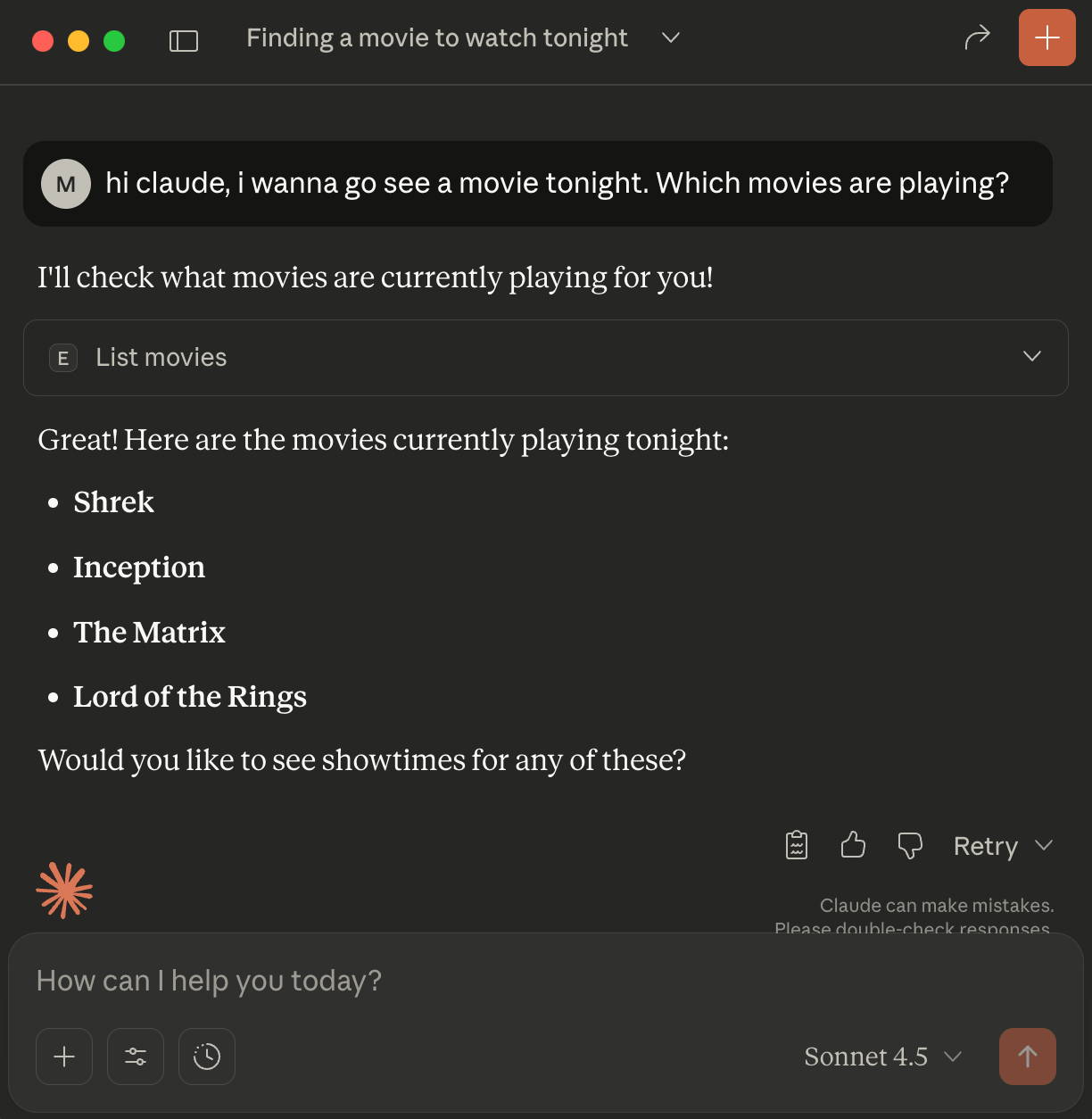
As you see, Claude has executed the function from our MCP server and has access to the resulting value. Very easy in just a few lines of code.
With a few more lines we wrap even more API endpoints in our MCP server and allow the LLM to call functions that show screening times and even allow the LLM to perform actions on our behalf by making a reservation:
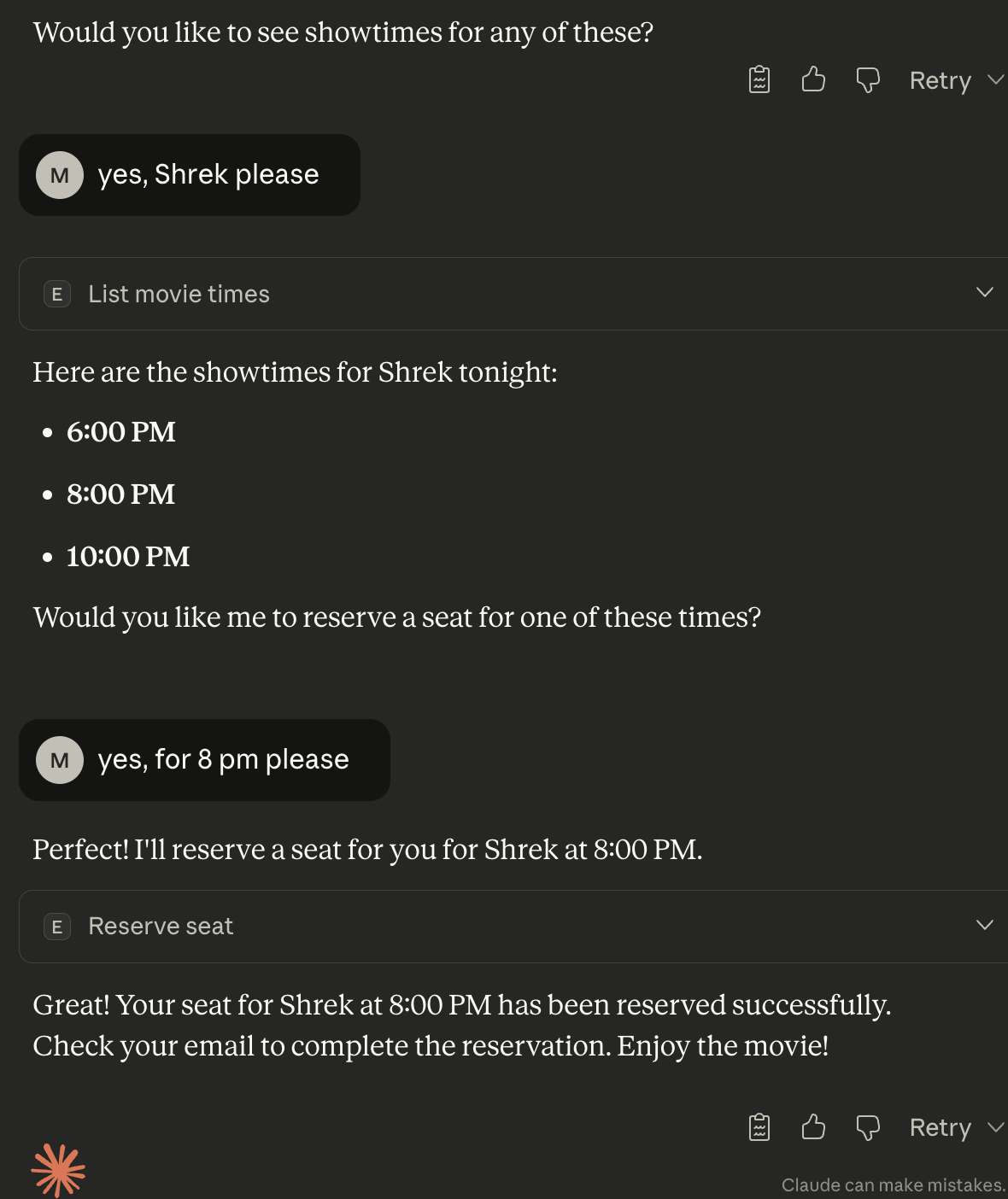
Note that although the examples are deliberately simplified, the principle stays the same: we allow our LLM to retrieve information and act on our behalf, through the cinema API
3) When to use MCP
MCP is ideal when:
- You want an LLM to access live data
- You want an LLM to perform actions (create tasks, fetch files, write records)
- You want to expose internal systems in a controlled way
- You want to share your tools with others as a package they can plug into their LLM
Users benefit because MCP lets their LLM become a more powerful assistant.
Providers benefit because MCP lets them expose their systems safely and consistently.
A common pattern is a “tool suite” that exposes backend APIs. Instead of clicking through UI screens, a user can ask an assistant to handle the workflow for them.
4) Considerations
Since its release in November 2024, MCP has been widely adopted and quickly became the default way to connect AI agents to external systems. But it's not without trade-offs; MCP introduces structural overhead and real security risks, in my opinion, engineers should be aware of before using it in prodution.
Security
If you download an unknown MCP server and connect it to your LLM, you are effectively granting that server file and network access, access to local credentials and command execution permissions. A malicious tool could:
- read or delete files
- exfiltrate private data (
.sshkeys e.g.) - scan your network
- modify production systems
- steal tokens and keys
MCP is only as save as the server you choose to trust. Without guardrails you're basically giving an LLM full control over your computer. It makes it very easy to over-expose since you can easily add tools.
The browser-extension analogy applies here as well: most are safe but malicious ones can do real damage. Like browser extensions, use trusted sources like verified repositories, inspect source code if possible and sandbox execution when you're unsure. Enforce strict permissions and leas-privilege policies.
Inflated context window, token inefficiency and latency
MCP servers describe every tool in detail: names, argument schema's, descriptions and result formats. The LLM client loads all this metadata up-front into the model context so that it knows which tools exist and how to use it.
This means that if your agent uses many tools or complex schemas, the prompt can grow significantly. Not only does this use a lot of token, it also uses up remaining space for conversation history and task-specific instructions. Every tool you expose permanently eats a slice of the available context.
Additionally, every tool call introduces reasoning overhead, schema parsing, context reassignment and a full round-trip from model -> MCP client -> MCP server -> back to the model. This is far too heavy for latency-sensitive pipelines.
Complexity shifts into the model
The LLM must make all the tough decisions:
- whether to call a tool at all
- which tool to call
- which arguments to use
All of this happens inside the model's reasoning rather than through explicit orchestration logic. Although initially this feels magically convenient and efficient, at scale this may become unpredictable, harder to debug and more difficult to guarantee deterministically.
Conclusion
MCP is simple and powerful at the same time. It's a standardized way to let LLMs call real programs. Once a program implements MCP, any compliant LLM client can use it as an extension. This opens the door to assistants that can query API's, perform tasks and interact with real systems in a structured way.
But with great power comes great responsibility. Treat MCP servers with the same caution as software that has full access to your machine. Its design also introduces implications for token usage, latency and strain on the LLM. These trade-offs may undermine the core benefit of MCP is known for: turning agents into efficient, real-world tools.
When used intentionally and securely, MCP offers a clean foundation for building agentic assistants that can actually do things rather than just talk about them.
I hope this article was as clear as I intended it to be but if this is not the case please let me know what I can do to clarify further. In the meantime, check out my other articles on all kinds of programming-related topics.
Happy coding!
— Mike
P.s: like what I'm doing? Follow me!


